盧家亨
Thanks for stopping by — happy exploring!
v2.6.0 Last updated 11/18/25
盧家亨
Thanks for stopping by — happy exploring!
v2.6.0 Last updated 11/18/25
盧家亨
Thanks for stopping by — happy exploring!
v2.6.0 Last updated 11/18/25
Presto
Presto
Harmonizing Rehearsals for Ensemble Musicians
UX/UI, Tablet, Product Design, Design Systems
UX/UI, Tablet, Product Design, Design Systems
2025
2025
OVERVIEW
An iPad note-taking tool for music
An iPad note-taking tool for music
Presto is a collaborative music platform designed to facilitate communication between musicians who rehearse in groups. It was developed to address efficiency in the UCLA Chinese Music Ensemble so that instructors could help performers stay in sync without interrupting rehearsal flow.
Presto is a collaborative music platform designed to facilitate communication between musicians who rehearse in groups. It was developed to address efficiency in the UCLA Chinese Music Ensemble so that instructors could help everyone stay in sync without interrupting rehearsal flow.
On the Presto Design Team, I worked with cross-collaborative teams to design solutions for multi-user note-taking around constraints in musical notation.
On the Presto Design Team, I worked with cross-collaborative teams to design solutions for multi-user note-taking around constraints in musical notation.
TIMELINE
7 WEEK SPRINT
ROLE
PRODUCT DESIGNER
CONTRIBUTORS
5 PRODUCT DESIGNERS
5 FULL-STACK ENGINEERS
2 PRODUCT MANAGERS
TIMELINE
7 WEEK SPRINT
ROLE
PRODUCT DESIGNER
CONTRIBUTORS
5 PRODUCT DESIGNERS
5 FULL-STACK ENGINEERS
2 PRODUCT MANAGERS

PROBLEM
How might we help musicians save time navigating music tools and files?
How might we help musicians save time navigating music tools and files?
According to students at Duke, 18% of rehearsal time lost to tuning, announcements, and organizing music. Furthermore, the UCLA Philharmonia reported feeling frustrated with having to retrace notes after receiving new annotated music.
18% of rehearsal time lost to tuning, announcements, and organizing music.
(Duke University)
92% of musicians valued collaborative digital annotations.
(Orchestre National d'Île-de-France digital score pilot (Newzik))
Frustrated with having to retrace notes after receiving new annotated music.
Frustrated with having to retrace notes after receiving new annotated music.
(UCLA Philharmonia)
18% of rehearsal time lost to tuning, announcements, and organizing music.
(Duke University)
92% of musicians valued collaborative digital annotations.
(Orchestre National d'Île-de-France digital score pilot (Newzik))
Frustrated with having to retrace notes after receiving new annotated music.
Frustrated with having to retrace notes after receiving new annotated music.
(UCLA Philharmonia)
COMPETITIVE
ANALYSIS
COMPETITIVE ANALYSIS
COMPETITIVE
ANALYSIS
Evaluating our scope by investigating features currently on the market.
Evaluating our scope by investigating features currently on the market.
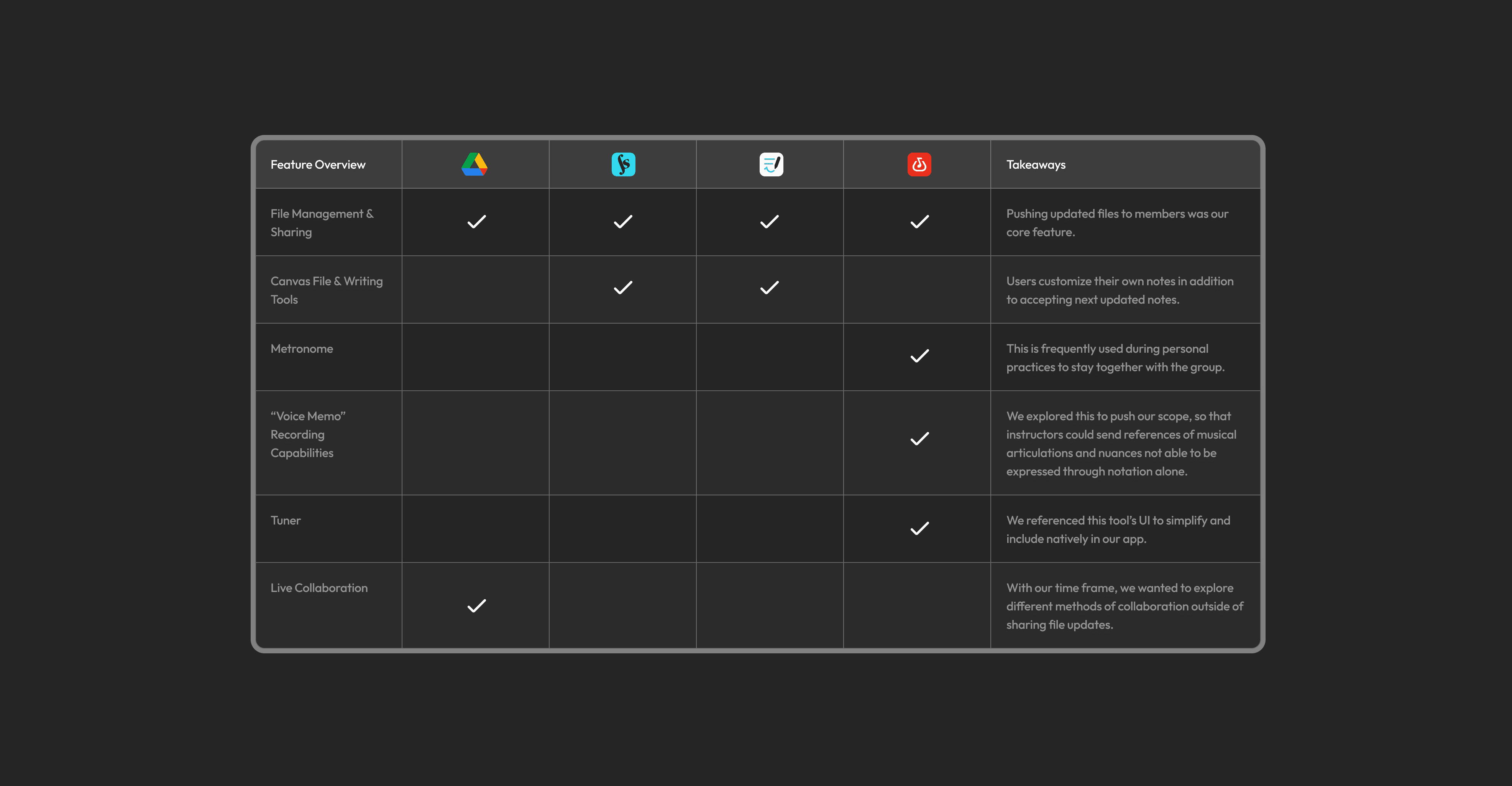
The goal of Presto was not to invent novel technology but instead to compile familiar tools to musicians to integrate into their pre-existing workflow. Therefore, it was integral that we compare tools that musicians were already using.
The goal of Presto was not to invent novel technology but instead to compile familiar tools to musicians to integrate into their pre-existing workflow. Therefore, it was integral that we compare tools that musicians were already using.
FEATURE ANALYSIS
FEATURE ANALYSIS
EARLY DISCOVERY
Whiteboarding to brainstorm key features based on potential user interactions.
Whiteboarding to brainstorm key features based on potential user interactions.
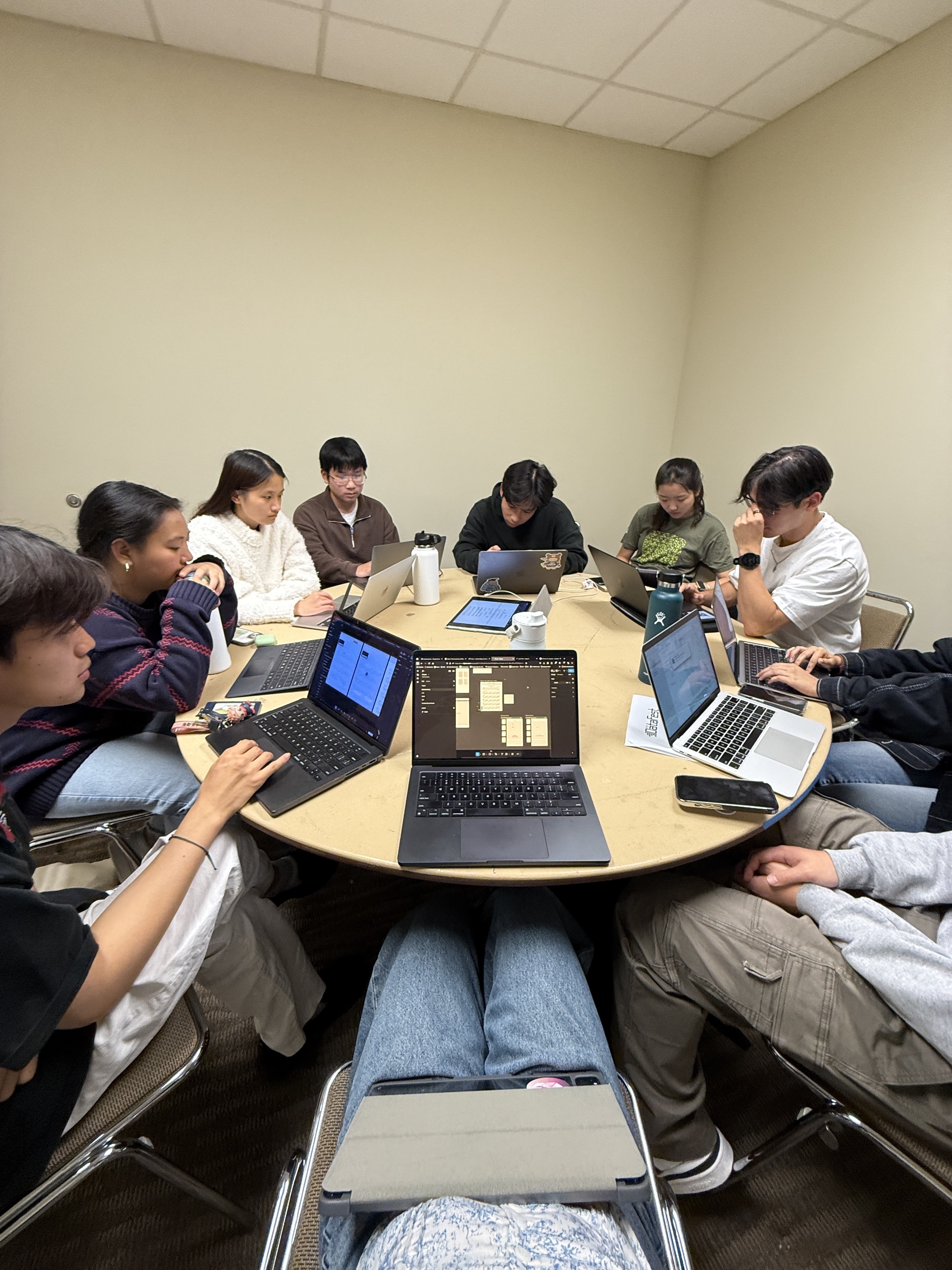
Our team was comprised of 13 members, all of whom are musicians. So, we got in a room and discussed the feedback we got from user interviews in addition to our own experiences.
Some music directors shared that having to manage more tools would only disrupt their flow, so we accounted for that in our narrowing down process.
Our team was comprised of 13 members, all of whom are musicians. So, we got in a room and discussed the feedback we got from user interviews in addition to our own experiences.
Some music directors shared that having to manage more tools would only disrupt their flow, so we accounted for that in our narrowing down process.
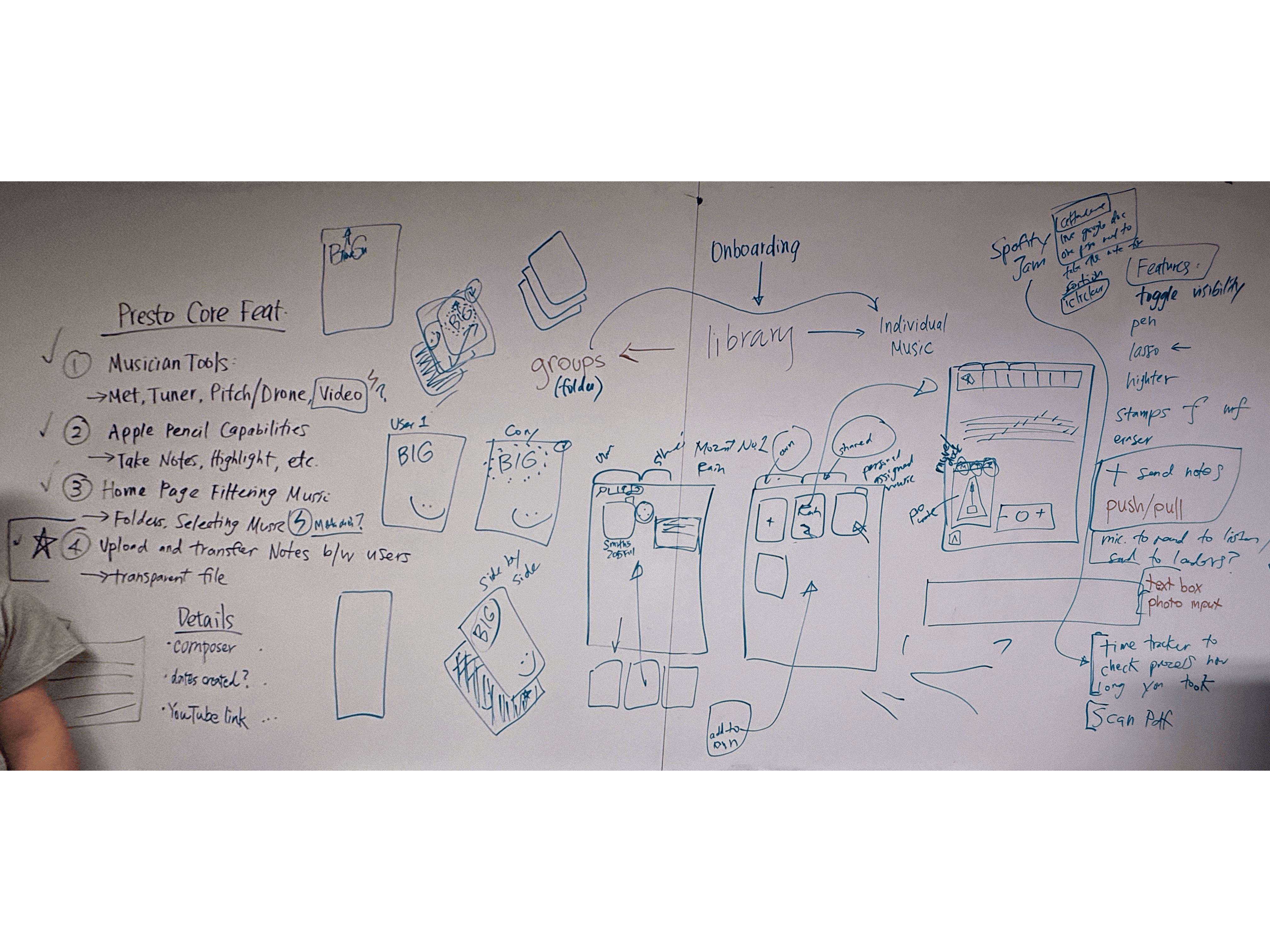
Defining core MVP's after discussing technical capabilities.
Defining core MVP's after discussing technical capabilities.
We challenged ourselves to cut small quality-of-life features like an iClicker-like rehearsal sessions to track attendance, video-demo integrations, and time-stamping. Ultimately the use cases for these features don't attack the core issue of mid-rehearsal efficiency and could be resolved using other apps.
We challenged ourselves to cut small quality-of-life features like an iClicker-like rehearsal sessions to track attendance, video-demo integrations, and time-stamping. Ultimately the use cases for these features don't attack the core issue of mid-rehearsal efficiency and could be resolved using other apps.
Sharable Music Repository
Teams can access their files via a shared drive that can be filtered via composer, date of creation, file type, etc.
Annotations & Practice Tools
Standard markup tools and music notation stamps allow users to notate specific articulations, fingering orders, bowing styles, and dynamics. A metronome, tuner, and drone facilitate both ensemble and individual practicing.
Transferrable Notes
Shared notes appear on transparent, toggled layers that the recipient user can choose to accept and customize upon reviewing.
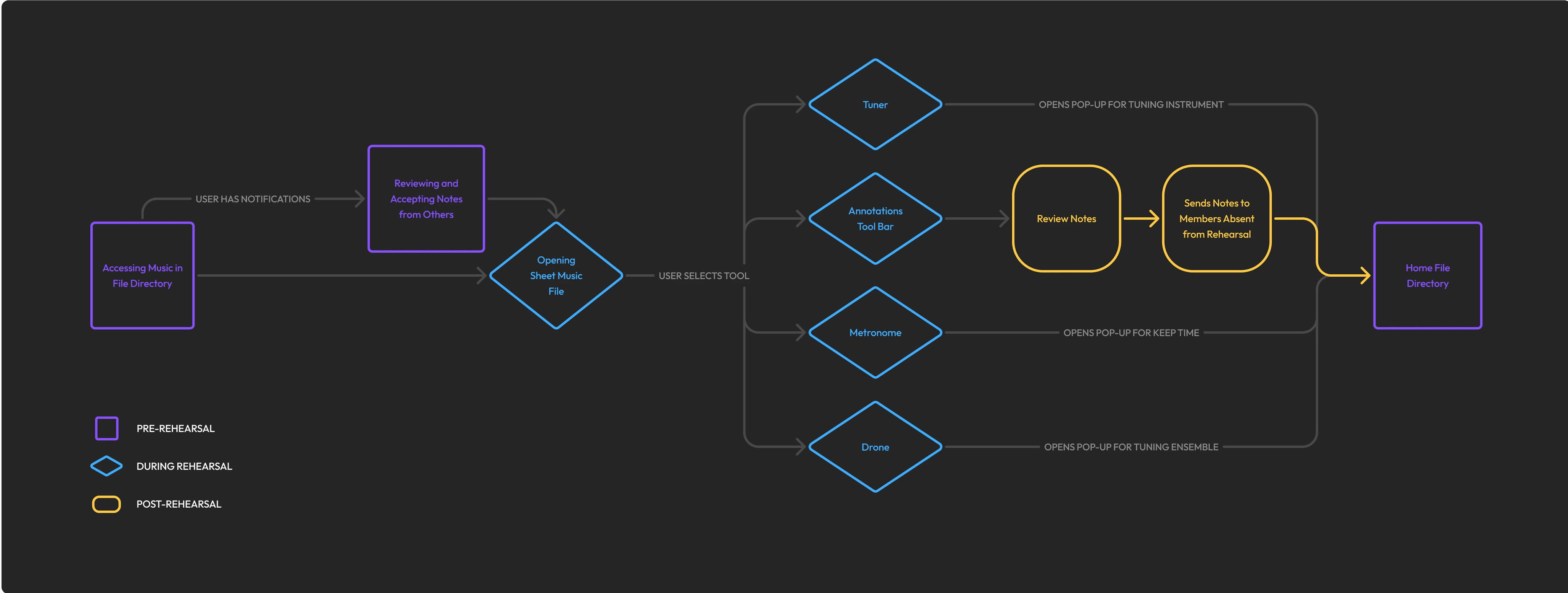
USER JOURNEY
Sharable Music Repository
Teams can access their files via a shared drive that can be filtered via composer, date of creation, file type, etc.
Annotations & Practice Tools
Standard markup tools and music notation stamps allow users to notate specific articulations, fingering orders, bowing styles, and dynamics. A metronome, tuner, and drone facilitate both ensemble and individual practicing.
Transferrable Notes
Shared notes appear on transparent, toggled layers that the recipient user can choose to accept and customize upon reviewing.
Sharable Music Repository
Teams can access their files via a shared drive that can be filtered via composer, date of creation, file type, etc.
Annotations & Practice Tools
Standard markup tools and music notation stamps allow users to notate specific articulations, fingering orders, bowing styles, and dynamics. A metronome, tuner, and drone facilitate both ensemble and individual practicing.
Transferrable Notes
Shared notes appear on transparent, toggled layers that the recipient user can choose to accept and customize upon reviewing.
USER JOURNEY
USER JOURNEY
ITERATION
After early user testing of the sheet music page, I realized that the information architecture was inconvenient.
After early user testing of the sheet music page, I realized that the information architecture was inconvenient.
To start, I conceptualized a dropdown menu of writing tools so that the UI could be cleaner and less distracting. But to easily take notes, the tools had to be easily accessible and visible. Therefore, I placed them all in a header bar, similar to Goodnotes. I also initially added a small dock for music tools, similar to Figma.
I saw that taking inspiration from similar programs works but doesn't make sense in all cases. The dock at the bottom inhibited the ability for fast scrolling via slider and the note-taking tools at the top didn't allow for quick switching and undos/redos. I revised.
To start, I conceptualized a dropdown menu of writing tools so that the UI could be cleaner and less distracting. But to easily take notes, the tools had to be easily accessible and visible. Therefore, I placed them all in a header bar, similar to Goodnotes. I also initially added a small dock for music tools, similar to Figma.
I saw that taking inspiration from similar programs works but doesn't make sense in all cases. The dock at the bottom inhibited the ability for fast scrolling via slider and the note-taking tools at the top didn't allow for quick switching and undos/redos. I revised.
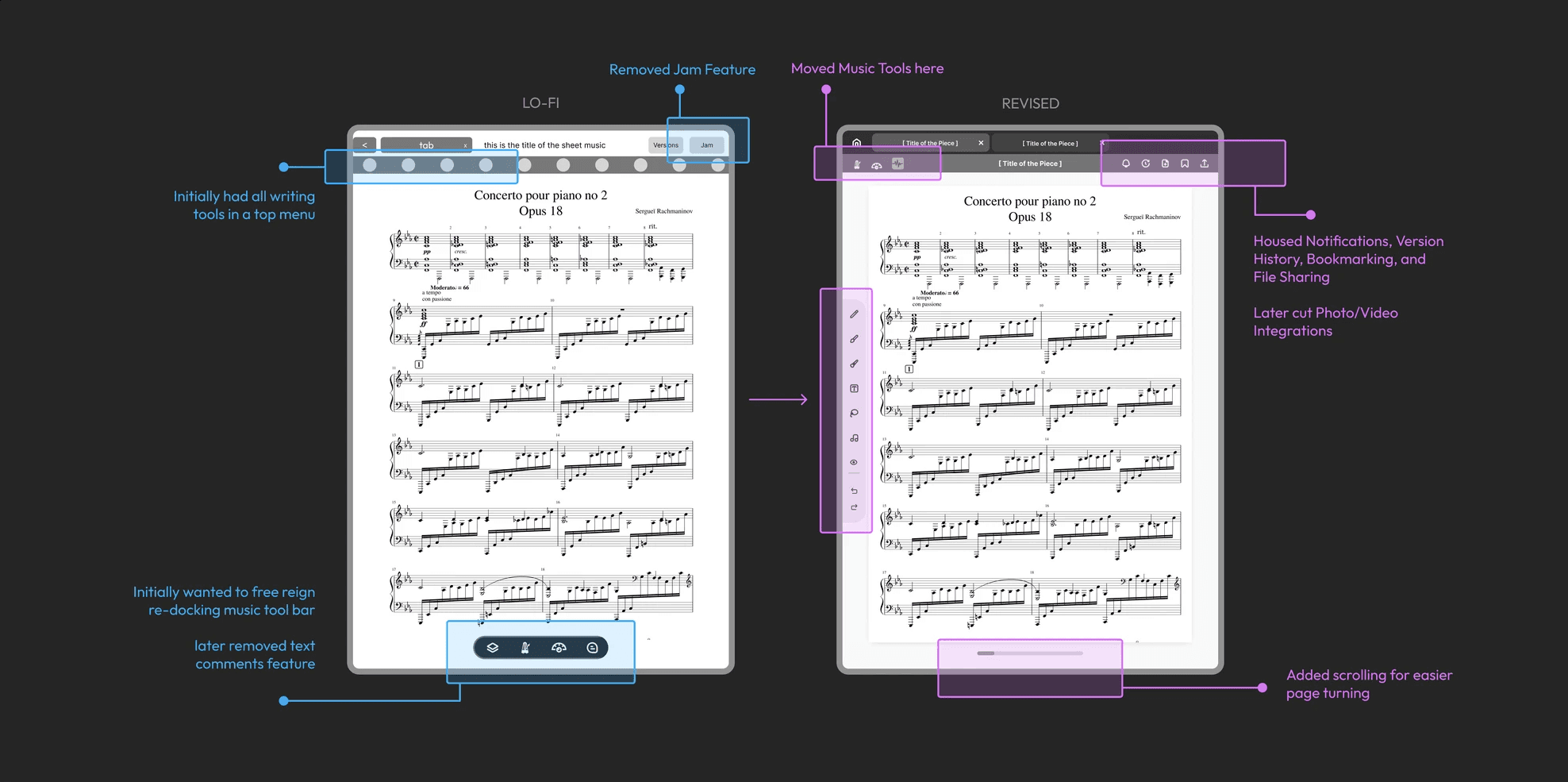
LO-FI DESIGNS
LO-FI DESIGNS
Referencing external music tools and stripping them down to their bare bones.
Referencing external music tools and stripping them down to their bare bones.
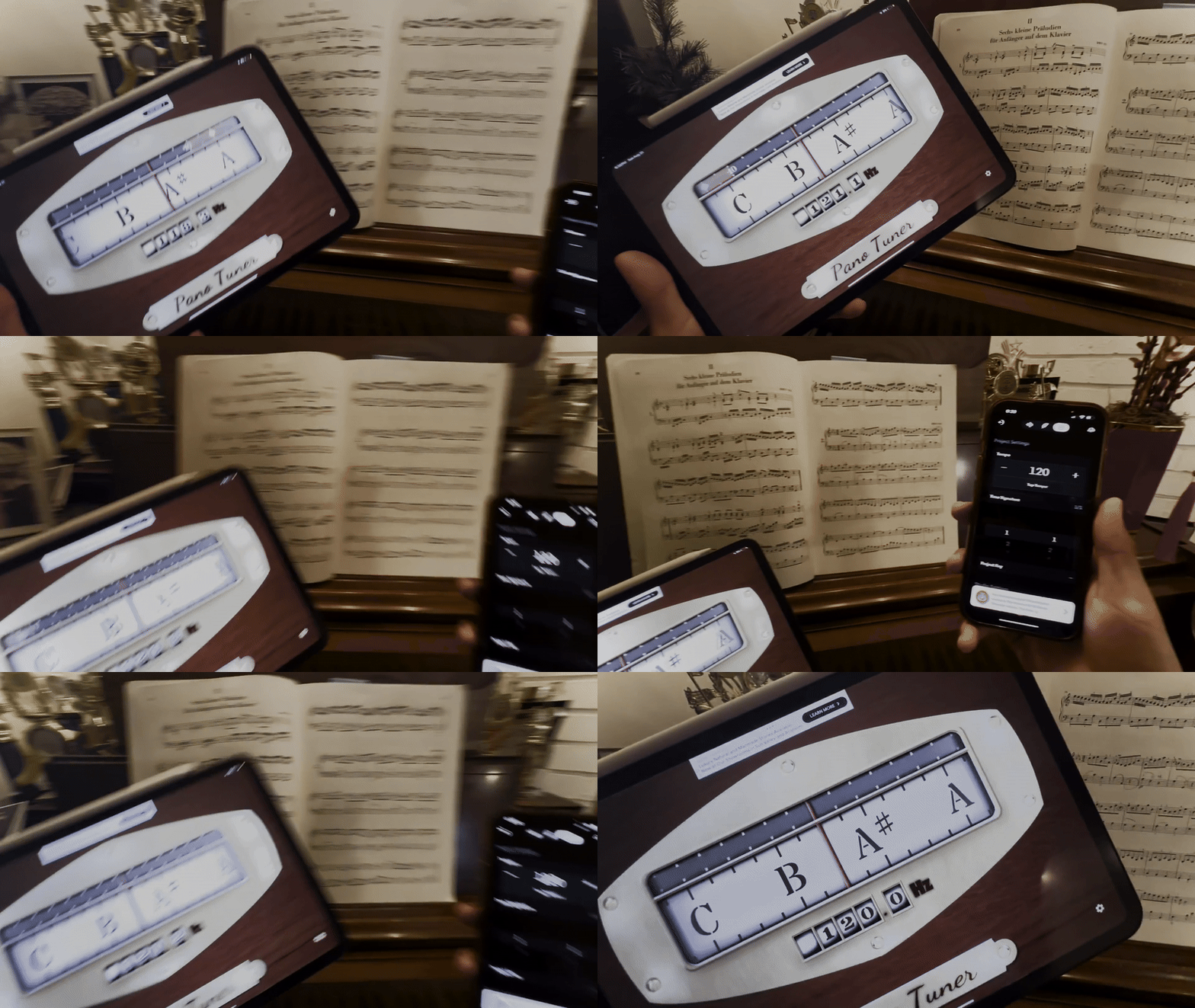
To create the music tools, I had to condense entire apps into small pop-up windows. I found that these external music tools often tend to use skeuomorphic UI that clashed with Presto's design system. To avoid that, I focused on simple iconography and discoverability, meaning that customization would be hidden in a separate settings tab to reduce written instruction and clutter.
To create the music tools, I had to condense entire apps into small pop-up windows. I found that these external music tools often tend to use skeuomorphic UI that clashed with Presto's design system. To avoid that, I focused on simple iconography and discoverability, meaning that customization would be hidden in a separate settings tab to reduce written instruction and clutter.
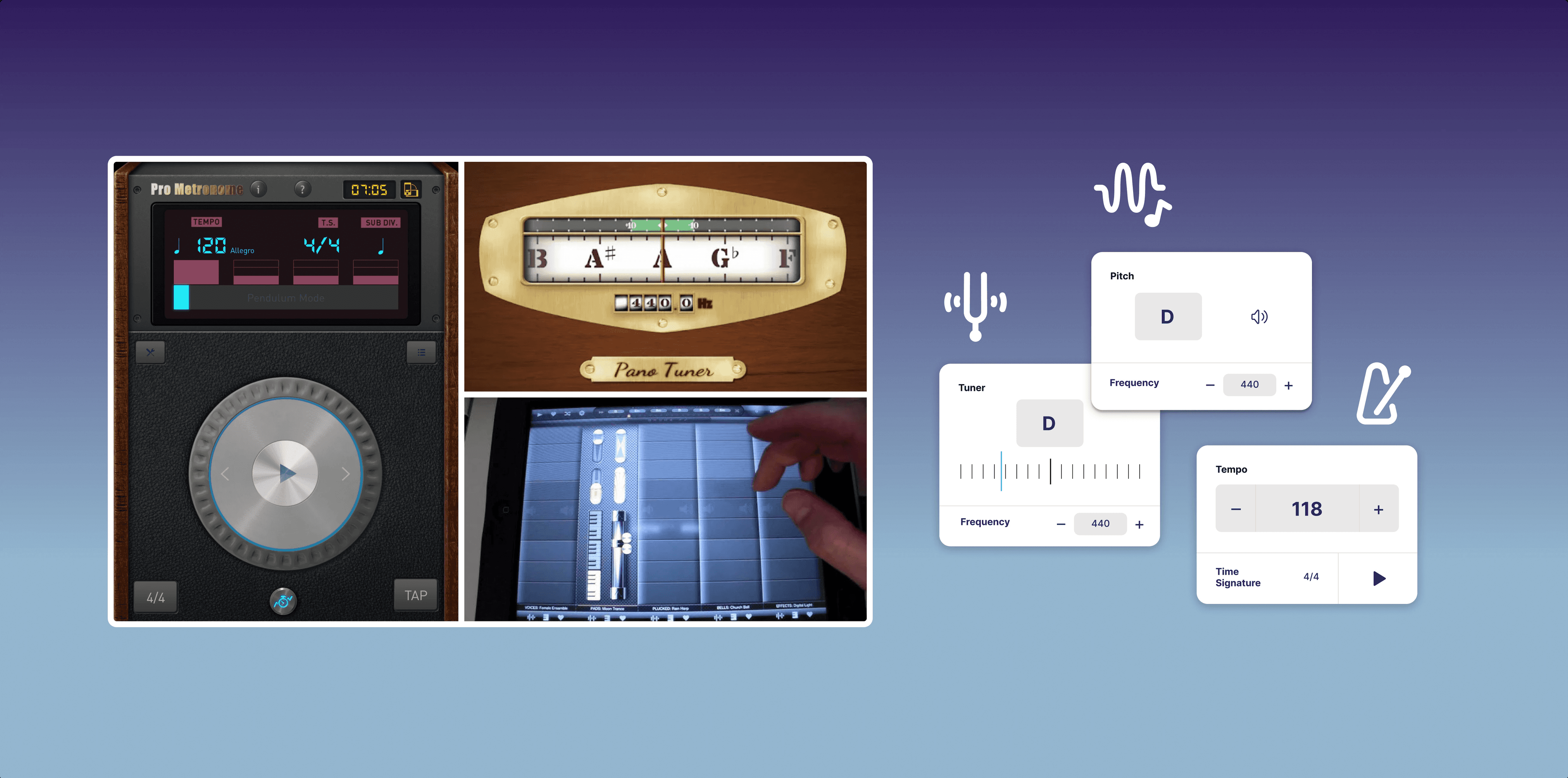
MUSIC TOOL ANALYSIS
MUSIC TOOL ANALYSIS
DESIGN SYSTEM
Presto's colors and UI elements were selected with intention.
Presto's colors and UI elements were selected with intention.
Each button and card was crafted to be easy to navigate with clear CTA's. Each tool relied on clear iconography that was tweaked to be more easily identifiable without explanation. To ensure that the typography was legible and accessible, we frequently checked font sizing on Figma's iPad previews.
As for colors, purple is associated with the richness and grandeur of orchestral music, whereas blue conveys the tranquility of many classical pieces.
Each button and card was crafted to be easy to navigate with clear CTA's. Each tool relied on clear iconography that was tweaked to be more easily identifiable without explanation. To ensure that the typography was legible and accessible, we frequently checked font sizing on Figma's iPad previews.
As for colors, purple is associated with the richness and grandeur of orchestral music, whereas blue conveys the tranquility of many classical pieces.
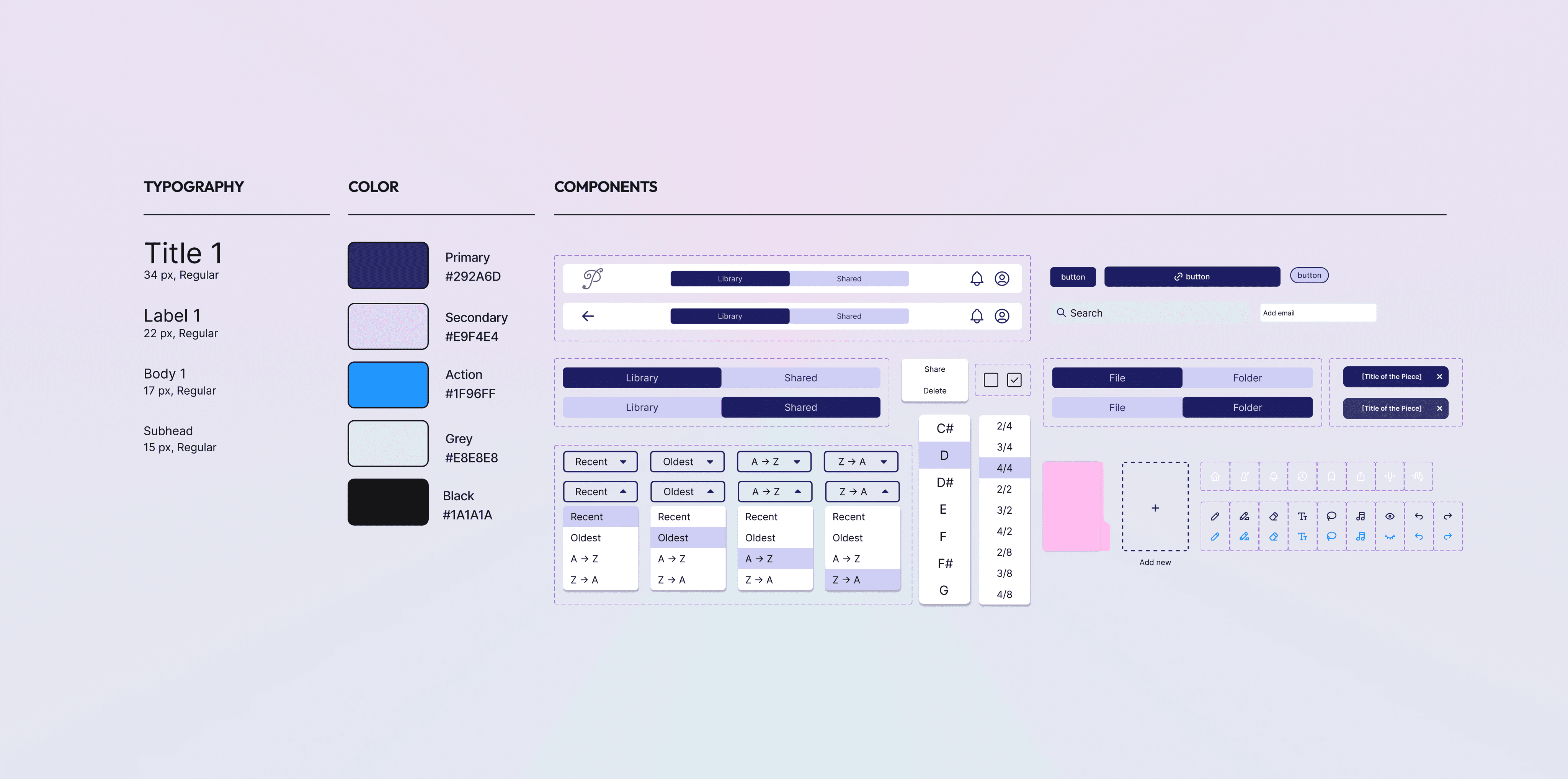
STYLE SHEET
STYLE SHEET
SOLUTION
Streamlining music rehearsals in one centralized hub of tools and file management.
Streamlining music rehearsals in one centralized hub of tools and file management.
Note-taking Tailored for Music
Note-taking Tailored for Music
A standard pen, highlighter, eraser, and text tools allow for freeform markings. For musical markings, there is a sticker sheet of musical notation stamps, eliminating the need to redraw.
The user can lasso each marking to reposition and toggle visibility for notes when they need to read the music unobstructed.
A standard pen, highlighter, eraser, and text tools allow for freeform markings. For musical markings, there is a sticker sheet of musical notation stamps, eliminating the need to redraw.
The user can lasso each marking to reposition and toggle visibility for notes when they need to read the music unobstructed.
WRITING TOOLS
WRITING TOOLS
Pushing Updates to Replace Retracing
Pushing Updates to Replace Retracing
When several users mark the same spot, clutter can build up. To balance flexibility and clarity, we limited notes to two layers: a shared layer for collaboration and a personal layer for individual practice and reminders. Users can erase or reposition elements before saving, which avoids flattening into unreadable overlaps without creating endless layers to manage.
When several users mark the same spot, clutter can build up. To balance flexibility and clarity, we limited notes to two layers: a shared layer for collaboration and a personal layer for individual practice and reminders. Users can erase or reposition elements before saving, which avoids flattening into unreadable overlaps without creating endless layers to manage.
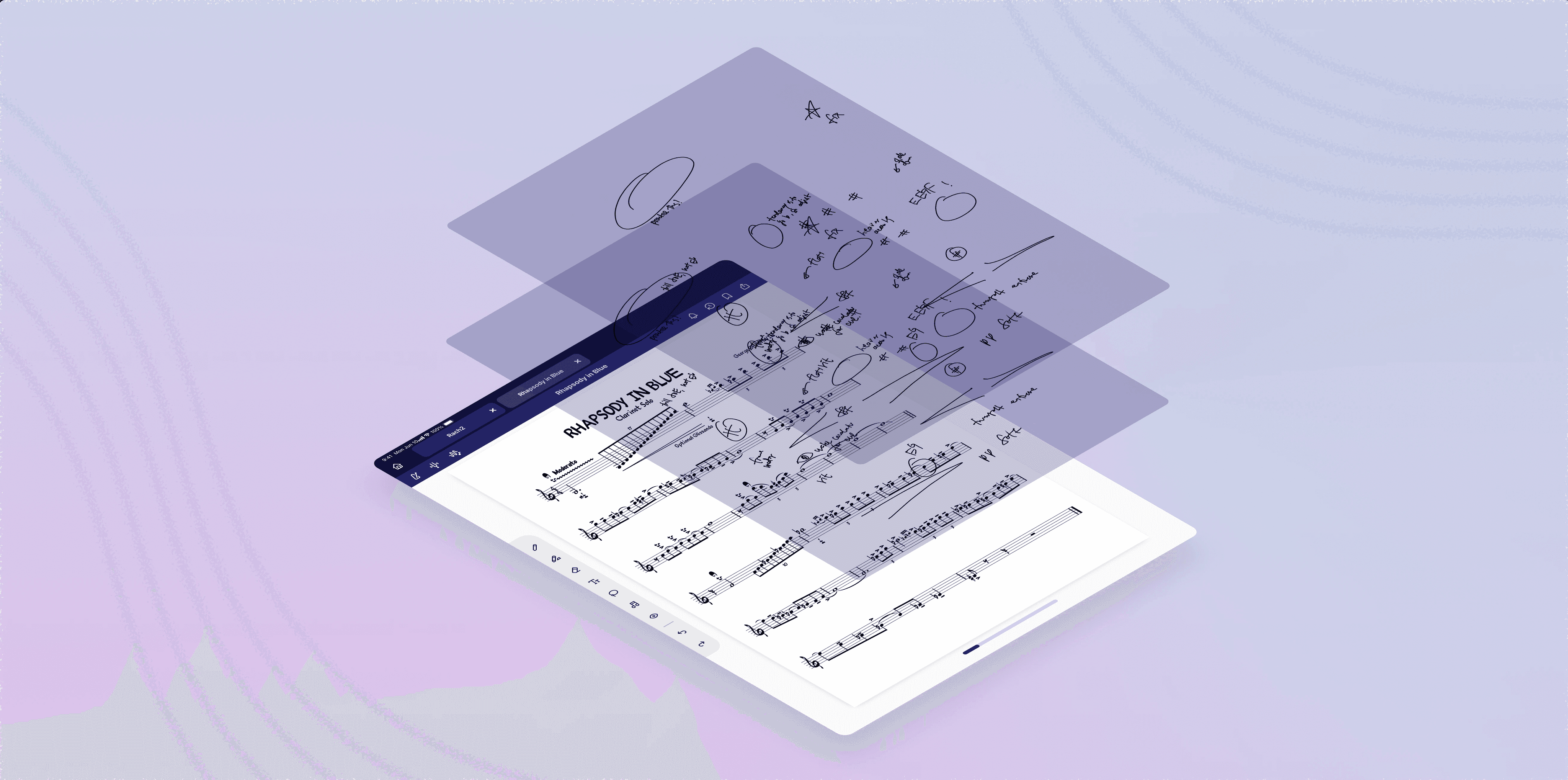
NOTE SHARING
NOTE SHARING
Quick Access to Music Tools
Quick Access to Music Tools
Music Tools allow the user to tune their instrument or voice without ever leaving the app. When it's time for asynchronous practice, they can keep time with a built-in metronome.
Music Tools allow the user to tune their instrument or voice without ever leaving the app. When it's time for asynchronous practice, they can keep time with a built-in metronome.
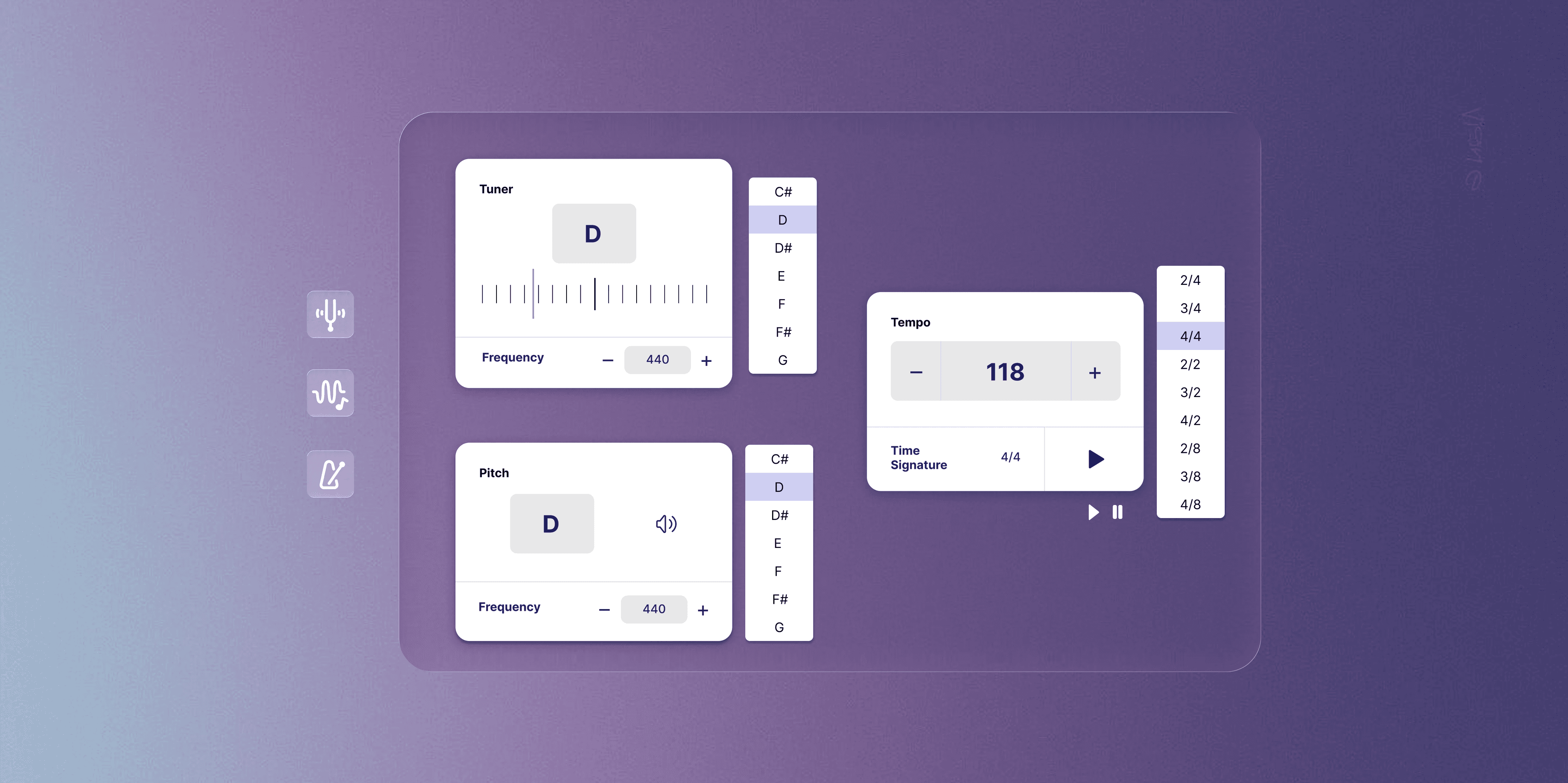
MUSIC TOOLS
MUSIC TOOLS
Team File Sharing & Storage
Team File Sharing & Storage
Users can access a drive of shared files from their group or their own personal files. Access is granted via an invite system.
Users can access a drive of shared files from their group or their own personal files. Access is granted via an invite system.
FILE DIRECTORY
FILE DIRECTORY
REFLECTION
Resounding takeaways
Resounding takeaways
#1 All Perspectives Matter, Speak Up.
While all team members were musicians, my experience with a cappella, dance, and choir granted me a different perspective than ensembles alone. I suggested voice memo/video storage directly in the app so that directors could conduct progress checks on absent individuals. Although this wasn't implemented in our initial feature set, it remains a long-term goal.
#2 Simplifying Can Smoothen Edge Cases
Sharing capabilities were challenging when consider users' differing version histories and layers. Limiting affordances for layer usage directed the user to a simpler flow that worked in more cases.
#3 More is Not Always Better
When the goal was to streamline workflow, adding more features was not the answer. It complicated things and caused more mental hurdles. Working with developers and time constraints put us in a position to really emphasize what features we needed to prioritize.
If I could do things differently…
I would design different breakpoints in the wireframe stage. I advocated for accounting for horizontal iPad use cases, but we prioritized completion given our time constraints.
#1 Speak Up in the Room
While all team members were musicians, my experience with a cappella, dance, and choir granted me a different perspective than ensembles alone. I suggested voice memo/video storage directly in the app so that directors could conduct progress checks on absent individuals. Although this wasn't implemented in our initial feature set, it remains a long-term goal.
#2 Simplifying Can Smoothen Edge Cases
Sharing capabilities were challenging when consider users' differing version histories and layers. Limiting affordances for layer usage directed the user to a simpler flow that worked in more cases.
#3 More is Not Always Better
When the goal was to streamline workflow, adding more features was not the answer. It complicated things and caused more mental hurdles. Working with developers and time constraints put us in a position to really emphasize what features we needed to prioritize.